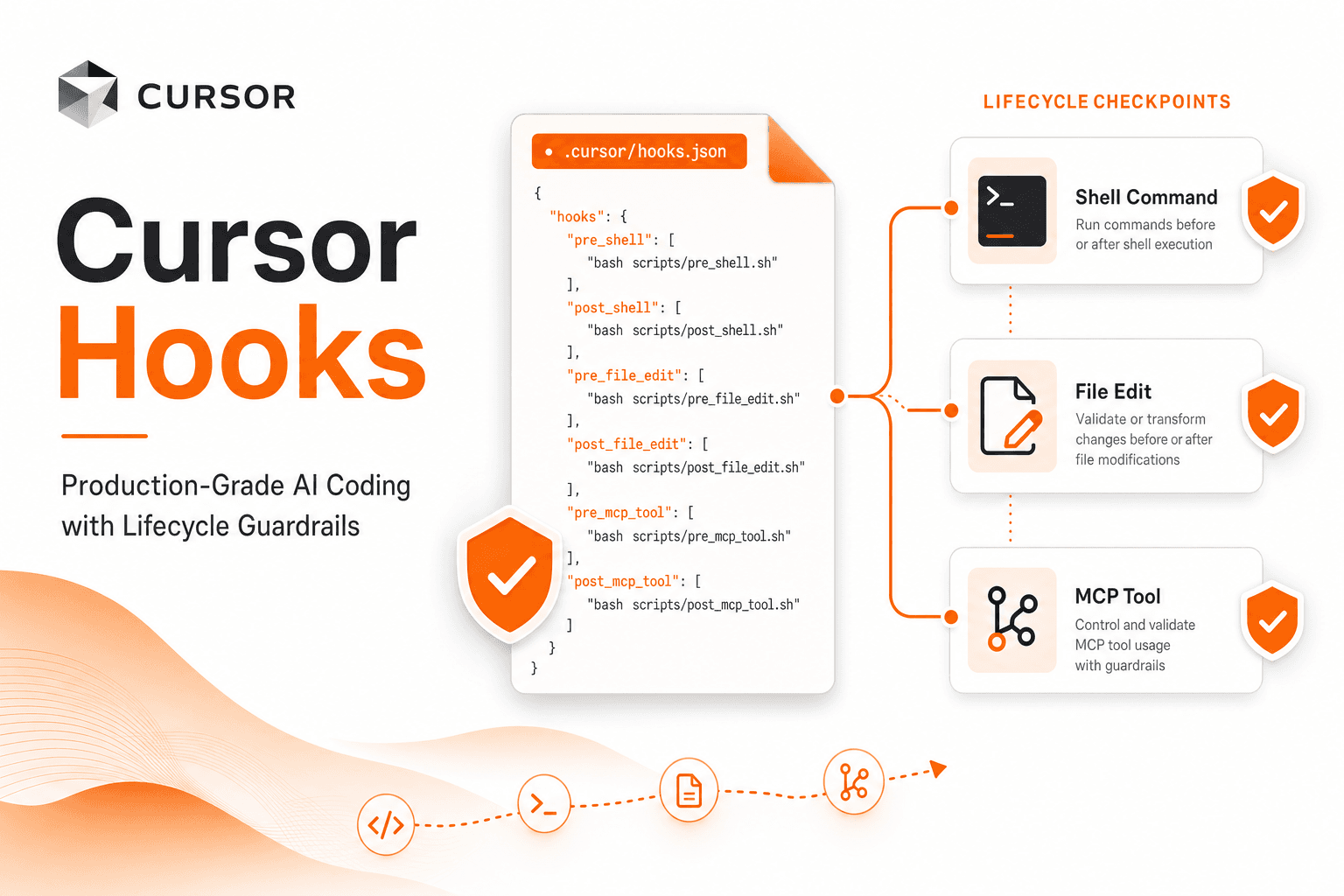
Cursor hooks.json: the JSON Schema & Payload Reference
Every Cursor hooks.json event with its stdin JSON payload fields: afterFileEdit edits, exit codes, matchers, failClosed, and copy-paste recipes.

Nicolás Torres
If you've used git hooks, you already understand the idea. A commit hook runs your linter before code lands in history. A pre-push hook blocks you from pushing to main by mistake. The hook doesn't replace git. It sits on the lifecycle and enforces policy.
Cursor hooks do the same thing for AI coding agents. They fire when the agent reads a file, runs a shell command, calls an MCP tool, edits code, or spawns a subagent. You can log what happened, rewrite the request, or block it entirely.
Rules tell the model what you want. Skills package reusable instructions. Hooks are the only one that can actually stop the agent from doing something.
This post is a practical guide to hooks.json: what it is, how to create hooks in Cursor and Claude Code, how the schema works, copy-paste recipes, and how the two platforms compare.
How to create hooks
Neither platform hides hooks behind a single magic command. The workflows differ.
Cursor
Cursor does not have Claude's /hooks browser. It has /create-hook, a built-in Agent skill you invoke as a slash command. Describe what you want ("block rm -rf, auto-format after edits") and it scaffolds .cursor/hooks.json plus the hook scripts.
Other ways to add hooks:
| Method | What it does |
|---|---|
/create-hook | Fastest path. Agent skill that writes hooks.json and scripts from a plain-language request. |
Write .cursor/hooks.json by hand | Full control. Create the JSON and scripts under .cursor/hooks/, then chmod +x them. |
| Customize > Hooks | Settings gear → Customize → Hooks tab. Inspect loaded hooks and debug execution. Pair with the Hooks output channel (Cmd+Shift+P → "Hooks"). |
| Enterprise / team dashboard | Enterprise admins configure hooks at cursor.com/dashboard. Synced to all team machines. |
| Plugins | Hooks can ship inside Cursor plugins from the marketplace. |
| Reuse Claude Code hooks | Enable third-party skills in Cursor Settings. Existing .claude/settings.json hooks are auto-mapped to Cursor event names (third-party hooks docs). |
Project hooks live at .cursor/hooks.json (committed to git). User hooks live at ~/.cursor/hooks.json (machine-wide).
Claude Code
Claude Code has /hooks, a slash command that opens a read-only browser. It lists configured hooks by event, shows matchers, commands, and source files. Per the official guide: "The /hooks menu is read-only. To add, modify, or remove hooks, edit your settings JSON directly or ask Claude to make the change."
To create hooks:
| Method | What it does |
|---|---|
Edit settings.json | Add a "hooks" block to ~/.claude/settings.json (user-wide) or .claude/settings.json (project, shareable via git). |
| Ask Claude | Describe the policy in the CLI. Claude can write the hook JSON and script files for you. |
/hooks | Inspect what's configured. Read-only. |
| Plugins | Plugins can bundle hooks/hooks.json. |
| Skill / agent frontmatter | Hooks can also live in a skill or subagent definition while that component is active. |
| Managed settings | Enterprise admins deploy hooks via managed policy; allowManagedHooksOnly can block user/project hooks. |
Hook config can also live in .claude/settings.local.json (project-local, gitignored).
Claude's schema is nested (event → matcher group → handler array). Cursor's is flatter (event → array of hook entries with command and matcher on the same object). Same concept, different JSON shape.
Git hooks, but for your agent
An AI coding session is a stream of actions: read files, run terminals, edit code, call external tools. Most of that is useful. Some of it is dangerous (rm -rf, piping curl to bash), noisy (unformatted diffs), or policy-sensitive (reading .env files into context).
Without hooks, your only levers are:
- Prompting ("please don't run destructive commands")
- Rules (
.cursor/rules, always-on instructions) - Manual review (watching every tool call)
Prompting and rules are soft guardrails. The model can ignore them under pressure, context compaction, or a cleverly phrased task. Hooks are hard guardrails. They run outside the model, on every matching event, before the action completes.
Cursor shipped hooks in 2024 and has iterated heavily since. As of 2026, it remains the most mature editor-integrated hook system, with deep Tab, Agent, and workspace lifecycle coverage. Claude Code has caught up on the CLI agent loop side with a larger raw event count.
Official docs: cursor.com/docs/agent/hooks
Hook priority (highest wins on conflict): Enterprise → Team → Project → User. Enterprise paths include /Library/Application Support/Cursor/hooks.json (macOS) and /etc/cursor/hooks.json (Linux).
Rules, Skills, and Hooks
These three features overlap in conversation, but they solve different problems.
| Feature | What it does | Can it block? |
|---|---|---|
| Rules | Inject coding conventions and project context into the system prompt | No |
| Skills | Reusable, shareable instruction packs the agent can invoke | No |
| Hooks | Run scripts or prompt checks at lifecycle events | Yes |
Rules are great for "we use pnpm, not npm" or "follow this API pattern." Skills are great for repeatable workflows ("use this skill when creating a PR"). Hooks are for "if the agent tries to curl | bash, deny it" or "after every file edit, run Prettier."
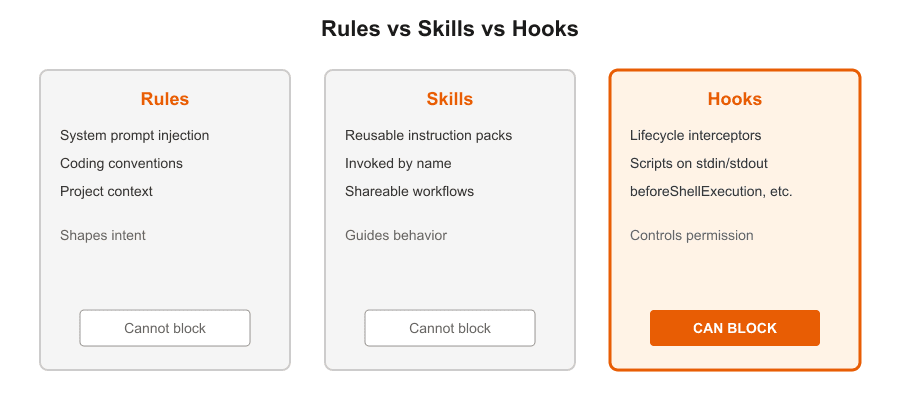
Think of it this way: rules shape intent. Hooks shape permission.
The hooks.json schema
Create .cursor/hooks.json in your project (or ~/.cursor/hooks.json for user-wide hooks). Project hooks are checked into git and shared with the team. User hooks apply to every repo on your machine.
The current schema (version 1) keys events by name:
{
  "version": 1,
  "hooks": {
    "beforeShellExecution": [
      {
        "command": ".cursor/hooks/approve-network.sh",
        "matcher": "curl|wget|nc ",
        "failClosed": true,
        "timeout": 10
      }
    ],
    "afterFileEdit": [
      {
        "command": ".cursor/hooks/format.sh"
      }
    ]
  }
}
Key fields per hook entry:
| Field | Description |
|---|---|
command | Path to a script (command hooks) |
type | "command" (default) or "prompt" (LLM-evaluated policy) |
matcher | JavaScript regex string; hook only runs when the event payload matches |
failClosed | If true, hook crash/timeout blocks the action; default is fail-open |
timeout | Max seconds before the hook is killed |
loop_limit | Auto-disable after N invocations. Default is 5 for stop and subagentStop; set null for no limit |
Path rules:
- Project hooks: commands relative to repo root (
.cursor/hooks/my-hook.sh) - User hooks: commands relative to
~/.cursor/(./hooks/my-hook.sh)
Cursor watches hooks.json and reloads on save. If hooks don't appear, restart Cursor and check the Hooks output channel (Cmd+Shift+P → "Hooks").
Events you can hook
Cursor exposes hooks across the full agent lifecycle. The ones you'll use most:
Session: sessionStart, sessionEnd, stop, preCompact
Tools: preToolUse, postToolUse, postToolUseFailure, beforeSubmitPrompt
Shell: beforeShellExecution, afterShellExecution
Files: beforeReadFile, afterFileEdit
MCP: beforeMCPExecution, afterMCPExecution
Subagents: subagentStart, subagentStop
Agent output: afterAgentResponse, afterAgentThought
Tab (inline completions): beforeTabFileRead, afterTabFileEdit
App lifecycle: workspaceOpen (fires when a workspace opens or folders change; can return plugin paths to load)
Use the narrowest event. If you only care about shell commands, use beforeShellExecution, not preToolUse.
Cloud agents
Cloud agents run project hooks from .cursor/hooks.json in your repo. They do not see user-level ~/.cursor/hooks.json. Command hooks work; prompt hooks do not (no auth wiring in the cloud VM). Events that do not fire in cloud agents: sessionStart and sessionEnd (session lifecycle is tied to the IDE session), beforeMCPExecution and afterMCPExecution, the Tab hooks (beforeTabFileRead, afterTabFileEdit), and workspaceOpen. Everything else runs in cloud agents, including beforeSubmitPrompt, preCompact, stop, afterAgentResponse, and afterAgentThought.
Command hooks: stdin and stdout
Command hooks receive JSON on stdin and may return JSON on stdout.
Exit codes:
0= success2= block (same as returningpermission: "deny")- Other non-zero = fail open unless
failClosed: true
Blocking events (beforeShellExecution, beforeMCPExecution, preToolUse, subagentStart) return:
{
  "permission": "allow",
  "user_message": "Optional message shown to you",
  "agent_message": "Optional message injected for the agent"
}
permission can be "allow", "ask", or "deny".
preToolUse can also return updated_input to rewrite the tool call before it runs.
postToolUse can return additional_context (and updated_mcp_tool_output for MCP tools).
subagentStop can return followup_message to chain subagent loops.
Prompt hooks
For policies that are easier to describe than to script, use "type": "prompt":
{
  "version": 1,
  "hooks": {
    "beforeShellExecution": [
      {
        "type": "prompt",
        "prompt": "Does this command look safe? Only allow read-only operations. Hook input: $ARGUMENTS",
        "timeout": 10
      }
    ]
  }
}
Prompt hooks are flexible. Command hooks are deterministic and auditable. For security policy, prefer command hooks.
Matchers
Matchers filter when a hook runs. They use JavaScript regex, not POSIX/grep syntax. Use \s not [[:space:]].
| Event | Matcher matches against |
|---|---|
beforeShellExecution | Full shell command string |
preToolUse / postToolUse | Tool name (Shell, Read, Write, Task, MCP: ...) |
beforeReadFile | Tool type (Read, TabRead) |
afterFileEdit | Tool type (Write, TabWrite) |
subagentStart / subagentStop | Subagent type (explore, shell, generalPurpose, ...) |
beforeSubmitPrompt | UserPromptSubmit |
If a matcher is tricky, get the hook working without one first, then tighten it.
Event payload reference
Every command hook receives a JSON object on stdin. These are the key fields per event, based on the typed definitions in the cursor-hooks npm package and Cursor's docs.
All events share four base fields:
{
  "conversation_id": "uuid",
  "generation_id": "uuid",
  "hook_event_name": "afterFileEdit",
  "workspace_roots": ["/path/to/repo"]
}| Event | stdin payload (key fields) | stdout response |
|---|---|---|
beforeShellExecution | command, cwd | { "permission": "allow" | "ask" | "deny", "user_message", "agent_message" } |
beforeMCPExecution | tool_name, tool_input, url?, command? | same permission response |
beforeReadFile | file_path, content, attachments | { "permission": "allow" | "deny" } |
beforeSubmitPrompt | prompt, attachments | { "continue": true } |
afterFileEdit | file_path, edits ({ old_string, new_string }[]) | none (side-effect only) |
preToolUse | tool name + input | permission response, plus updated_input to rewrite the call |
postToolUse | tool name + input + output | additional_context, updated_mcp_tool_output |
subagentStart / subagentStop | subagent type | subagentStop can return followup_message |
sessionStart | session info | additional_context (fire-and-forget) |
stop | status ("completed", "aborted", "error") | none |
Blocking events (beforeShellExecution, beforeMCPExecution, preToolUse, subagentStart) can return permission: "allow" | "ask" | "deny" plus optional user_message and agent_message. Exit code 2 is equivalent to permission: "deny".
Hook recipes you can copy today
Each recipe includes the hooks.json entry and a hook script. Put scripts in .cursor/hooks/ and chmod +x them. Recipes 1-5 are the essentials; 6-8 come from official Cursor docs; 9 is the run-tests pattern.
1. Block dangerous shell commands
The most common first hook. Stop the agent from running obviously destructive patterns.
.cursor/hooks.json:
{
  "version": 1,
  "hooks": {
    "beforeShellExecution": [
      {
        "command": ".cursor/hooks/block-dangerous.sh",
        "matcher": "rm\\s+-rf|curl.*\\|\\s*bash|wget.*\\|\\s*sh",
        "failClosed": true
      }
    ]
  }
}.cursor/hooks/block-dangerous.sh:
#!/bin/bash
input=$(cat)
command=$(echo "$input" | jq -r '.command // empty')

echo "{
  \"permission\": \"deny\",
  \"user_message\": \"Blocked by project hook: $command\",
  \"agent_message\": \"A beforeShellExecution hook denied this shell command. Choose a safer alternative.\"
}"
exit 0
Set failClosed: true so a crashed script blocks execution rather than silently passing through.
2. Auto-format after every file edit
Agents produce working code with inconsistent formatting. Run Prettier (or your formatter) on every write.
.cursor/hooks.json:
{
  "version": 1,
  "hooks": {
    "afterFileEdit": [
      {
        "command": ".cursor/hooks/format.sh"
      }
    ]
  }
}.cursor/hooks/format.sh:
#!/bin/bash
input=$(cat)
file=$(echo "$input" | jq -r '.file_path // .filePath // empty')

if [ -n "$file" ] && [ -f "$file" ]; then
  npx prettier --write "$file" 2>/dev/null || true
fi

exit 0
afterFileEdit hooks don't need to return JSON if they're side-effect only. The agent already wrote the file; you're post-processing it.
3. Secret scanning before file reads
Keep .env, keys, and credential files out of the agent's context.
.cursor/hooks.json:
{
  "version": 1,
  "hooks": {
    "beforeReadFile": [
      {
        "command": ".cursor/hooks/block-secrets.sh",
        "matcher": "\\.(env|pem|key)$|credentials",
        "failClosed": true
      }
    ]
  }
}.cursor/hooks/block-secrets.sh:
#!/bin/bash
input=$(cat)
path=$(echo "$input" | jq -r '.file_path // .filePath // .path // empty')

echo "{
  \"permission\": \"deny\",
  \"user_message\": \"Reading sensitive file blocked: $path\",
  \"agent_message\": \"This file may contain secrets. Do not read it into context. Use environment variables or a secrets manager instead.\"
}"
exit 0
For production, swap the simple path matcher for a gitleaks or trufflehog scan. The hook pattern is the same: read stdin, return permission: deny if policy fails.
4. Audit log every tool call
Observability for compliance, debugging, or "what did the agent actually do today?"
.cursor/hooks.json:
{
  "version": 1,
  "hooks": {
    "preToolUse": [
      {
        "command": ".cursor/hooks/audit-log.sh",
        "failClosed": false
      }
    ],
    "postToolUse": [
      {
        "command": ".cursor/hooks/audit-log.sh",
        "failClosed": false
      }
    ]
  }
}.cursor/hooks/audit-log.sh:
#!/bin/bash
input=$(cat)
log_dir=".cursor/hooks/audit"
mkdir -p "$log_dir"

echo "$(date -u +%Y-%m-%dT%H:%M:%SZ) $input" >> "$log_dir/tool-calls.jsonl"
exit 0
Add audit/ to .gitignore if you don't want logs in version control. For team-wide audit trails, pipe to stdout and ship to your log aggregator from a wrapper script.
failClosed: false here is intentional. Logging should never block the agent.
5. Subagent loop guard
Subagents are powerful and easy to overuse. loop_limit disables a hook after N firings per session. Pair it with logging on subagentStop:
.cursor/hooks.json:
{
  "version": 1,
  "hooks": {
    "subagentStop": [
      {
        "command": ".cursor/hooks/log-subagent.sh",
        "loop_limit": 50
      }
    ]
  }
}.cursor/hooks/log-subagent.sh:
#!/bin/bash
input=$(cat)
log_dir=".cursor/hooks/audit"
mkdir -p "$log_dir"

echo "$(date -u +%Y-%m-%dT%H:%M:%SZ) subagentStop $input" >> "$log_dir/subagents.jsonl"
exit 0
If you're building chained subagent workflows, subagentStop can also return a followup_message to continue the loop programmatically. Use loop_limit as a circuit breaker so a runaway chain doesn't burn your quota.
6. Redirect raw git to gh (official Cursor example)
Cursor's docs include a beforeShellExecution hook that blocks raw git commands and asks permission for gh. Useful when you want the agent on GitHub CLI, not ad-hoc git.
.cursor/hooks.json:
{
  "version": 1,
  "hooks": {
    "beforeShellExecution": [
      {
        "command": ".cursor/hooks/block-git.sh",
        "matcher": "git|gh "
      }
    ]
  }
}.cursor/hooks/block-git.sh:
#!/bin/bash
input=$(cat)
command=$(echo "$input" | jq -r '.command // empty')

if [[ "$command" =~ git[[:space:]] ]] || [[ "$command" == "git" ]]; then
  cat <<EOF
{
  "permission": "deny",
  "user_message": "Git command blocked. Use the gh tool instead.",
  "agent_message": "Raw git is blocked by project policy. Use gh for GitHub operations."
}
EOF
  exit 0
fi

if [[ "$command" =~ gh[[:space:]] ]] || [[ "$command" == "gh" ]]; then
  cat <<EOF
{
  "permission": "ask",
  "user_message": "GitHub CLI command requires approval: $command"
}
EOF
  exit 0
fi

echo '{"permission": "allow"}'
exit 0
7. Gate kubectl apply to production namespaces
From Cursor's official kube guard example. Requires pip install pyyaml.
.cursor/hooks.json:
{
  "version": 1,
  "hooks": {
    "beforeShellExecution": [
      {
        "command": "python3 .cursor/hooks/kube_guard.py",
        "matcher": "kubectl"
      }
    ]
  }
}.cursor/hooks/kube_guard.py: (abbreviated; full version in Cursor docs)
#!/usr/bin/env python3
import json, shlex, sys
from pathlib import Path

SENSITIVE = {"prod", "production"}

payload = json.load(sys.stdin)
command = payload.get("command", "")
response = {"permission": "allow"}

args = shlex.split(command)
if len(args) < 4 or args[0] != "kubectl" or args[1] != "apply":
    print(json.dumps(response)); sys.exit(0)

# If manifest or -n flag targets prod, require human approval
if "prod" in command.lower():
    response.update({
        "permission": "ask",
        "user_message": "kubectl apply touching prod requires manual approval."
    })

print(json.dumps(response))
8. Inject context at session start
Use sessionStart to prime the agent with sprint notes, test commands, or repo conventions. Fire-and-forget: the agent does not block on your script.
.cursor/hooks.json:
{
  "version": 1,
  "hooks": {
    "sessionStart": [
      {
        "command": ".cursor/hooks/session-context.sh"
      }
    ]
  }
}.cursor/hooks/session-context.sh:
#!/bin/bash
# sessionStart hooks can return additional_context on stdout
cat <<EOF
{
  "additional_context": "Project conventions: use pnpm not npm. Run pnpm test before committing. Current branch policy: no direct pushes to main."
}
EOF
exit 0
9. Run tests after every file edit
This one is requested often enough that it grew into its own guide, with the stdin payload deep dive, the monorepo variant, the version where the agent sees its own failures, and the Claude Code equivalent: Cursor hooks: run tests after every file edit.
The short version: an afterFileEdit command hook that runs your test command and exits 0. Leave failClosed unset (fail-open) so a red test is visible without bricking the agent's session. Pair it with a preToolUse hook if you would rather gate commits on green tests.
Claude Code equivalents
The same policies work in Claude Code with different event names and nested JSON. Examples from code.claude.com/docs/en/hooks-guide, and the Claude Code hooks guide covers the settings.json schema and every event in depth:
| Goal | Cursor event | Claude Code event |
|---|---|---|
| Block dangerous shell | beforeShellExecution | PreToolUse matcher Bash |
| Auto-format after edit | afterFileEdit | PostToolUse matcher Edit|Write |
| Desktop notification | N/A (IDE handles this) | Notification |
| Re-inject context after compaction | preCompact (observe) | SessionStart matcher compact |
| Scan prompts for PII | beforeSubmitPrompt | UserPromptSubmit |
Claude PreToolUse blocking uses exit code 2 (stderr message) or exit 0 with structured JSON:
{
  "hookSpecificOutput": {
    "hookEventName": "PreToolUse",
    "permissionDecision": "deny",
    "permissionDecisionReason": "Use a safer alternative."
  }
}
Do not mix both in one hook. Claude Code ignores JSON when you exit 2.
Claude notification hook (macOS):
{
  "hooks": {
    "Notification": [
      {
        "matcher": "",
        "hooks": [
          {
            "type": "command",
            "command": "osascript -e 'display notification \"Claude needs input\" with title \"Claude Code\"'"
          }
        ]
      }
    ]
  }
}
Add to .claude/settings.json. Run /hooks to verify it registered. Edit the JSON to change it; /hooks will not let you modify hooks in place.
Claude Code hooks: richer events, different JSON
Claude Code ships a full hook system for the CLI agent loop. The official reference documents events across the full lifecycle, including:
| Event | Fires when |
|---|---|
SessionStart | Session begins, resumes, clears, or compacts |
UserPromptSubmit | Before your prompt is processed |
PreToolUse / PostToolUse / PostToolUseFailure | Around tool execution |
PermissionRequest / PermissionDenied | Permission dialog flow |
Notification | Claude needs your attention |
SubagentStart / SubagentStop | Subagent lifecycle |
Stop / StopFailure | Turn completion or API error |
PreCompact / PostCompact | Context compaction |
ConfigChange | Settings file changes mid-session |
CwdChanged / FileChanged | Directory or watched file changes |
Claude supports five handler types: command (shell), http (POST to a URL), mcp_tool (call a connected MCP tool), prompt (single-turn LLM evaluation), and agent (multi-turn verification, experimental). Cursor supports command and prompt hooks.
When multiple hooks match the same event, Claude runs them in parallel and merges results. For PreToolUse permission decisions, the most restrictive answer wins: deny beats defer beats ask beats allow.
Configuration: Hooks live in settings.json under a "hooks" key, not a separate hooks.json. Project hooks: .claude/settings.json. User hooks: ~/.claude/settings.json.
Enterprise controls: allowManagedHooksOnly, strictPluginOnlyCustomization, and managed-settings deployment let admins lock down hook sources.
Schema shape (three levels deep):
{
  "hooks": {
    "PreToolUse": [
      {
        "matcher": "Bash",
        "hooks": [
          {
            "type": "command",
            "command": ".claude/hooks/guard.sh"
          }
        ]
      }
    ]
  }
}
Blocking: Exit 2 with a stderr message, or exit 0 with hookSpecificOutput.permissionDecision: "deny". Never mix both. A PreToolUse deny blocks the tool even in bypassPermissions mode.
Comparison:
| Aspect | Cursor | Claude Code |
|---|---|---|
| Config file | .cursor/hooks.json | settings.json inline |
| Create via slash command | /create-hook (scaffolds hooks) | No create command |
| Inspect via slash command | Customize > Hooks tab | /hooks (read-only browser) |
| Documented events | ~20 agent + Tab + workspace | Full lifecycle (see reference) |
| Schema | Flat per hook entry | Nested matcher groups |
| Matchers | Single regex per entry | Matcher + optional if filter on args |
failClosed | Per-hook boolean | Fail-open default; exit 2 blocks |
| Plugin hooks | Via Cursor plugins | Via plugin hooks/hooks.json |
| Third-party import | Reads Claude hooks when enabled | N/A |
| HTTP / MCP / agent hook types | Command + prompt only | command, http, mcp_tool, prompt, agent |
Cursor is stronger on IDE integration: Tab hooks, workspaceOpen, cloud agent pickup from repo-level config. Claude Code goes deeper on the CLI loop: notifications, compaction hooks, permission events, and HTTP/MCP hook types. Same idea, different runtimes.
The rest of the ecosystem
Most AI coding tools still lack a formal hook API:
| Tool | Hooks? | Notes |
|---|---|---|
| Cursor | Yes | hooks.json, 20+ events, blocking |
| Claude Code | Yes | settings.json, /hooks inspector, ask Claude to write hooks |
| Windsurf | No | Rules (.windsurfrules) only |
| Cline | No | .clinerules + custom MCP middleware |
| GitHub Copilot | No | VS Code extension API, not agent lifecycle |
| Aider | No | .aider.conf.yml conventions |
| OpenCode | No | CLI flags and env vars |
The gap matters for teams evaluating AI coding tools. Rules scale advice. Hooks scale policy. If your security team needs "the agent cannot exfiltrate secrets" to be enforceable, not aspirational, you need hooks or something equivalent.
Debugging and gotchas
Where to look: Cmd+Shift+P → "Hooks" opens the output channel. Hook stderr lands there. There is no interactive debugger; log liberally inside your scripts.
Common failures:
- Wrong path. Project hooks use
.cursor/hooks/...from repo root. User hooks use./hooks/...from~/.cursor/. - Missing shebang or execute bit. Scripts need
#!/bin/bashandchmod +x. - Missing dependencies. If your script calls
jq, verify it's on$PATHin the hook environment. Don't assume. - Matcher syntax. JavaScript regex, not grep. Start without a matcher, confirm the hook fires, then add filtering.
- Timeout. Default is a few seconds. Long hooks get killed; a killed hook with
failClosed: trueblocks the agent. - Circular invocations. A hook that shells out to
cursorCLI can recurse. Useloop_limit. - Windows. Shebang scripts won't work; use
.bat/.cmdor explicit interpreters.
Fail open vs fail closed: Default is fail-open (hook error → log and continue). Security hooks should set failClosed: true. Observability hooks should stay fail-open.
Schema mix-ups: Cursor and Claude use different JSON shapes. Cursor keys events in hooks.json with a flat array of { "command", "matcher" } objects. Claude nests matcher groups with a "hooks" array inside each group. Copy-pasting Claude examples into .cursor/hooks.json without translating the structure is a common source of silent failures.
PostToolUse is not an undo button. The tool has already run. Use PreToolUse, beforeShellExecution, or beforeReadFile when you need to block.
Shell gating: For Cursor, prefer beforeShellExecution over preToolUse when you only care about terminal commands. The permission: "ask" field on preToolUse is in the schema but not fully enforced today.
Cross-platform hooks: If you use both tools, enable third-party skills in Cursor to pick up existing .claude/settings.json hooks. Event names map automatically (PreToolUse → preToolUse). For full control, maintain a native .cursor/hooks.json alongside Claude config.
When to add hooks to your repo
Start here:
beforeShellExecutionwith a dangerous-command blocklist (recipe 1)afterFileEditwith your formatter (recipe 2)beforeReadFileif you have secrets in the repo (recipe 3)
Add audit logging when you need compliance or post-incident review. Add subagent guards when you start chaining Task agents. Consider recipes 6-8 for git policy, Kubernetes guardrails, and session context.
Check .cursor/hooks.json into git. Document what each hook does in a short README in .cursor/hooks/. Review hooks in PRs the same way you'd review CI config.
Rules tell the agent how to write code. Hooks define what it's allowed to do. For production AI coding, you want both.
Sources
- Cursor Hooks documentation
- Cursor third-party hooks (Claude compatibility)
- Cursor changelog
- Claude Code hooks guide
- Claude Code hooks reference
- Claude Code settings
- Model Context Protocol
Frequently asked questions
Does Cursor have hooks?
Yes. Cursor shipped lifecycle hooks in 2024 and has iterated heavily since. As of 2026 it is the most mature editor-integrated hook system, covering Tab, Agent, workspace, and cloud agent lifecycles. Configure hooks in .cursor/hooks.json (project) or ~/.cursor/hooks.json (user).
What is the hooks.json schema?
The current schema (version 1) keys events by name. Each event maps to an array of hook entries with fields like command, type, matcher, failClosed, timeout, and loop_limit. Project hooks live at .cursor/hooks.json relative to the repo root; user hooks live at ~/.cursor/hooks.json.
How do I run tests after every file edit?
Use an afterFileEdit command hook that runs your test command, and keep it fail-open so a failing test does not block the agent's edit. The full recipe, with the stdin payload, the monorepo variant, and the postToolUse alternative that shows failures back to the agent, lives in the dedicated guide at ntorres.dev/blog/cursor-hooks-run-tests-after-file-edit
What fields does the afterFileEdit stdin payload contain?
The afterFileEdit payload includes conversation_id, generation_id, hook_event_name, workspace_roots, file_path, and edits (an array of old_string/new_string pairs). Read it as JSON from stdin in your hook script.
Can I use Claude Code hooks in Cursor?
Yes. Enable third-party skills in Cursor Settings and existing .claude/settings.json hooks are auto-mapped to Cursor event names. Event names map automatically (PreToolUse becomes preToolUse). For full control, maintain a native .cursor/hooks.json alongside Claude config.
What is the difference between Cursor and Claude Code hooks?
Cursor uses a flat schema in .cursor/hooks.json where each event maps to an array of { command, matcher } entries. Claude Code nests matcher groups with a hooks array inside each group, stored in settings.json. Same idea, different JSON shapes.