Loop Engineering: Where Work Enters the Loop
How GitHub Issues, CI, Slack, and Linear become loop input: the intake pipeline nobody explains

Nicolás Torres
The question I hear most often after explaining loops: "OK, but where does the context come from? Bugs in Jira, messages in Slack, tickets in Linear. How does the loop know any of that exists?"
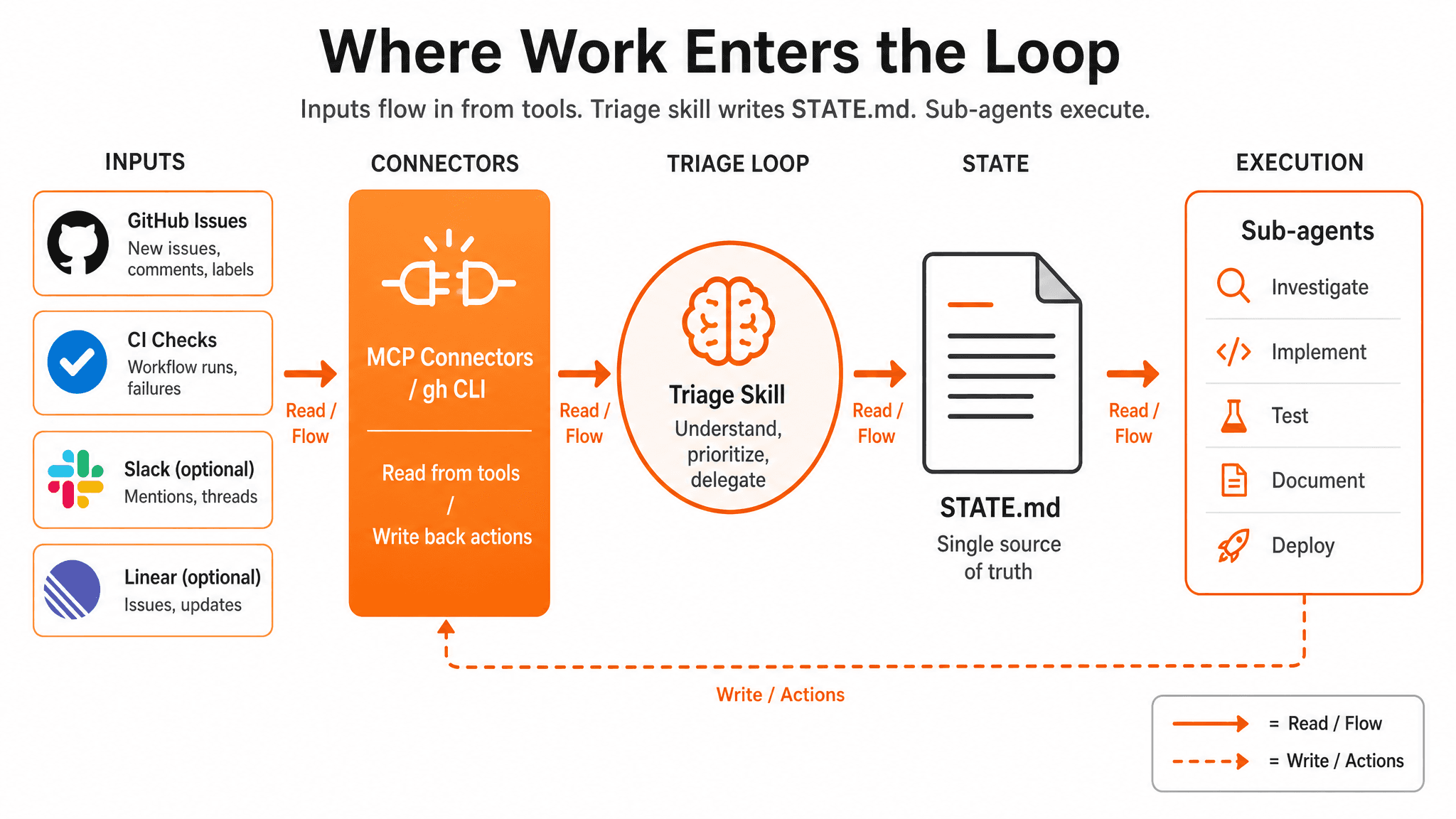
Short answer: nothing arrives by magic. Something fetches it on every run. Usually a triage skill plus connectors (MCP) or CLI tools. The loop normalizes what it finds into STATE.md, and everything downstream reads from there.
The Misconception
A loop is not a bigger prompt with institutional memory. It is a scheduled job that:
- Discovers work from external systems
- Normalizes findings into structured state
- Decides what to act on (or escalate to you)
If step 1 is missing, you have a cron job that re-reads the same README.md every morning. Useful for lint, useless for triage.
Three Layers of Intake
Layer 1: Filesystem (L1 default, no MCP required)
The agent can already see a lot without connectors:
git log --oneline -20for recent commitsgh pr list --base developfor open PRsgh issue list --label bugfor labeled bugs- Local test output if you run checks in the skill
This is enough for week one. Souso's Daily Triage at L1 uses gh against github.com/RonanCodes/smart-cart/issues.
Layer 2: Connectors / MCP (L1+ recommended)
MCP (Model Context Protocol) servers expose tools the agent calls during a run:
| Source | MCP tool examples | What the loop learns |
|---|---|---|
| GitHub | list_issues, get_pull_request, get_check_runs | Open bugs, PR status, CI red/green |
| Linear | list_issues, get_issue | Sprint backlog, blocked tickets |
| Jira | search_issues (JQL) | Bugs by priority, sprint scope |
| Slack | read_channel, search_messages | User-reported bugs, on-call threads |
The triage skill tells the agent which tools to call and how to format the output. The connector is the pipe; the skill is the brain.
Layer 3: Webhooks (advanced, optional)
Slack, Jira, and GitHub can push events to a queue when something changes. That's real-time intake: powerful, but more infrastructure than you need for week one. Start with pull-based discovery on a schedule.
Worked Example: Souso Daily Triage Run
Souso is the AI meal planner we shipped at Megathon Amsterdam: a team of seven, three devs committing code, less than 48 hours, more than 350 PRs merged. The L1 scaffold lives on feat/loop-engineering-daily-triage (PR #529). It uses GitHub Issues, not Linear or Jira. Here's what one run looks like.
1. The heartbeat fires
/loop 1d "Run loop-triage skill. Read STATE.md and loop-budget.md. Scan GitHub issues and develop PRs. Update STATE.md. Append to loop-run-log.md. L1: no code changes."2. The skill instructs discovery
The loop-triage skill (in .claude/skills/loop-triage/SKILL.md) says:
- Read prior
STATE.mdand prune closed/merged items - Fetch open issues with
ready-for-agentandbuglabels - Fetch open PRs to
develop; checkgateCI status - Flag stale issues (7+ days no activity)
The agent calls GitHub MCP or gh:
gh issue list --label ready-for-agent --state open
gh issue list --label bug --state open
gh pr list --base develop --json number,title,statusCheckRollup
3. Findings normalize into STATE.md
Raw API dumps are useless. The skill requires structured one-liners:
## High Priority
- #401: RangeError on /week, bug label, reproduce-first required
- CI: PR #512 gate failing on matcher eval

## Ready for Agent
- #444: Admin UX overhaul (design system)
- #428: Basket price comparison across supermarkets

## Waiting on Human
- #408: Beta-tester flow, proposal not confirmed
- #528: Ingredient replacement, needs scope before agent picks up
4. Next run picks up where this one stopped
Tomorrow's run reads STATE.md first. Closed issues get pruned. New #529 appears in Needs Triage. The loop compounds because state lives on disk, not in a forgotten chat session.
The Action Phase (L2+)
At L1, the loop stops at STATE.md. You read it over coffee.
At L2+, connectors write back:
| Action | Tool | Example on Souso |
|---|---|---|
| Comment on issue | GitHub MCP | "Loop: opened PR #515 for #401" |
| Open PR | GitHub MCP | Branch from worktree, link issue |
| Update ticket status | Linear/Jira MCP | Move to "In Review" |
| Escalate | Slack MCP | Post to #loop-escalations |
Write scopes come after a week of accurate L1 reports. Least privilege always.
If You Use Linear Instead of GitHub
Same pattern, different MCP server:
- Schedule fires triage skill
- Skill calls
linear.listIssues({ filter: { labels: ["ready-for-agent"] } }) - Skill writes normalized findings to
STATE.md - L2:
linear.updateIssueto comment or change status
The loop shape is identical. Only the connector changes.
If You Use Jira
- Skill runs JQL:
project = SOUSO AND labels = ready-for-agent AND status != Done - Normalize to
STATE.md - L2:
jira.addCommenton escalation
If You Use Slack for Bug Reports
Slack is usually a supplement, not the primary queue:
- Skill reads
#bugschannel for messages in the last 24h - Cross-reference with GitHub: if no issue exists, add to Waiting on Human: "Slack: user reported cart crash, no GitHub issue yet"
- L1 never auto-creates issues; a human decides whether to file one
Why STATE.md Is the Hub
External tools are messy. Different APIs, different field names, different labels. STATE.md is your canonical intake format, the lingua franca every loop run and every sub-agent understands.
GitHub ──┐
Linear ──┼──> Triage Skill ──> STATE.md ──> Sub-agents ──> PR / comment / escalate
Slack  ──┘
CI     ──┘
The connectors answer "where does work come from?" STATE.md answers "what should we do about it?"
Sources: Addy Osmani's Loop Engineering. The STATE.md intake hub pattern from Cobus Greyling's loop-engineering repo (MIT). Cobus Greyling's Loop Engineering essay.