
Loop Engineering: Building Your First Loop on Souso
A step-by-step walkthrough of scaffolding and running Daily Triage L1 on Souso (smart-cart): report-only, zero risk

Nicolás Torres
You know the primitives. You know where work enters the loop. Now we build one on a real repo.
Souso (smart-cart) is an AI meal planner deployed at souso.app. A team of seven built it at Megathon Amsterdam in less than 48 hours; three of us committed the code and merged more than 350 PRs over that weekend. It now has 50+ open GitHub issues, a ready-for-agent label queue, strict reproduce-first TDD, and a pnpm quality CI gate. We'll add a Daily Triage loop at L1 (report-only, no code changes, no risk).
By the end you'll have files in the repo and a schedule that surfaces bugs like #401 before you open GitHub.
Clone the Example
All loop files from this post are on branch feat/loop-engineering-daily-triage (PR #529):
git clone -b feat/loop-engineering-daily-triage https://github.com/RonanCodes/smart-cart.git
cd smart-cart
pnpm install
You do not need to merge the PR to follow along. The branch has the scaffold pre-seeded; run the steps below from that checkout.
Alternatively, scaffold any repo with Cobus Greyling's upstream tooling: npx @cobusgreyling/loop-init . --pattern daily-triage (loop-engineering repo). This walkthrough adapts that layout for Souso.
Prerequisites
You need:
- Claude Code, Codex App, or Grok with scheduling (
/loopor an equivalent automation) ghCLI logged in with read access to public issues and PRs (enough for L1)- The checkout above (
pnpm installpulls deps for skills and scripts; you do not need to run the app)
You do not need:
- Merge rights on Souso, a running dev server, or Cloudflare credentials
- To merge PR #529 (the branch is pre-seeded)
L1 triage only reads GitHub and edits loop files in the repo (STATE.md, loop-run-log.md). It never touches application source.
What We're Building
| Property | Value |
|---|---|
| Pattern | Daily Triage |
| Level | L1 (report-only) |
| Cadence | Once per day |
| Intake | GitHub Issues + PRs to develop |
| Output | STATE.md + loop-run-log.md |
| Code changes | None |
Step 1: Scaffold the Loop Files
The file layout follows Cobus Greyling's loop-engineering starters (MIT). We adapted denylist paths and Souso-specific rules below.
These files now live in the smart-cart repo root:
STATE.md              # Canonical loop memory
loop-run-log.md       # Append-only run history
loop-budget.md        # Token limits + denylist
LOOP.md               # Human-readable design doc
.claude/skills/loop-triage/SKILL.md
STATE.md answers three questions every run:
- What needs attention today? → High Priority
- What's scoped for an agent? → Ready for Agent
- What needs a human decision? → Waiting on Human
Starter content (already seeded with real Souso issues):
## High Priority
- #401: RangeError on /week, bug label, reproduce-first required

## Ready for Agent
- #444: Admin UX overhaul (design system)
- #428: Basket price comparison across supermarkets

## Waiting on Human
- #408: Beta-tester flow, proposal not confirmed
loop-budget.md encodes Souso-specific guardrails:
- Denylist:
src/lib/pricing/*, week generation internals, migrations, auth - Max 500k tokens/day
- L1 only, no sub-agents yet
LOOP.md documents the design so any teammate (or agent) can understand the loop without reading this blog post.
Step 2: Write the Triage Skill
The skill at .claude/skills/loop-triage/SKILL.md is the most important file. It tells the agent what to fetch and how to report.
Souso-specific rules baked in:
ready-for-agentlabel = agent queuebuglabel = always flag "reproduce-first required"- Ownership: issues touching
src/lib/pricing/*get "ownership review required" - Structured output only: one-liners, no prose (so L2 can parse
STATE.md) - L1 constraints: edit only
STATE.mdandloop-run-log.md
Step 3: Wire the Schedule
In Claude Code, from the smart-cart checkout:
/loop 1d "Run loop-triage skill. Read STATE.md and loop-budget.md. Scan GitHub issues and develop PRs. Update STATE.md with findings. Append one row to loop-run-log.md. L1: no code changes."Codex App alternative:
- Automations tab → new automation "Souso Daily Triage"
- Cadence: 1 day
- Prompt: same as above
- Results: Triage Inbox
Grok alternative:
/loop 1d Run loop-triage. Update STATE.md. No auto-fix.Step 4: Run Manually First
Before the schedule takes over:
/loop 0 "Run loop-triage once. Update STATE.md. Report findings."Read the output. Open STATE.md. Ask:
- Did it find #401 under High Priority?
- Did it list #444 and #428 under Ready for Agent?
- Did it flag #408 as Waiting on Human?
- Did it miss anything you'd expect?
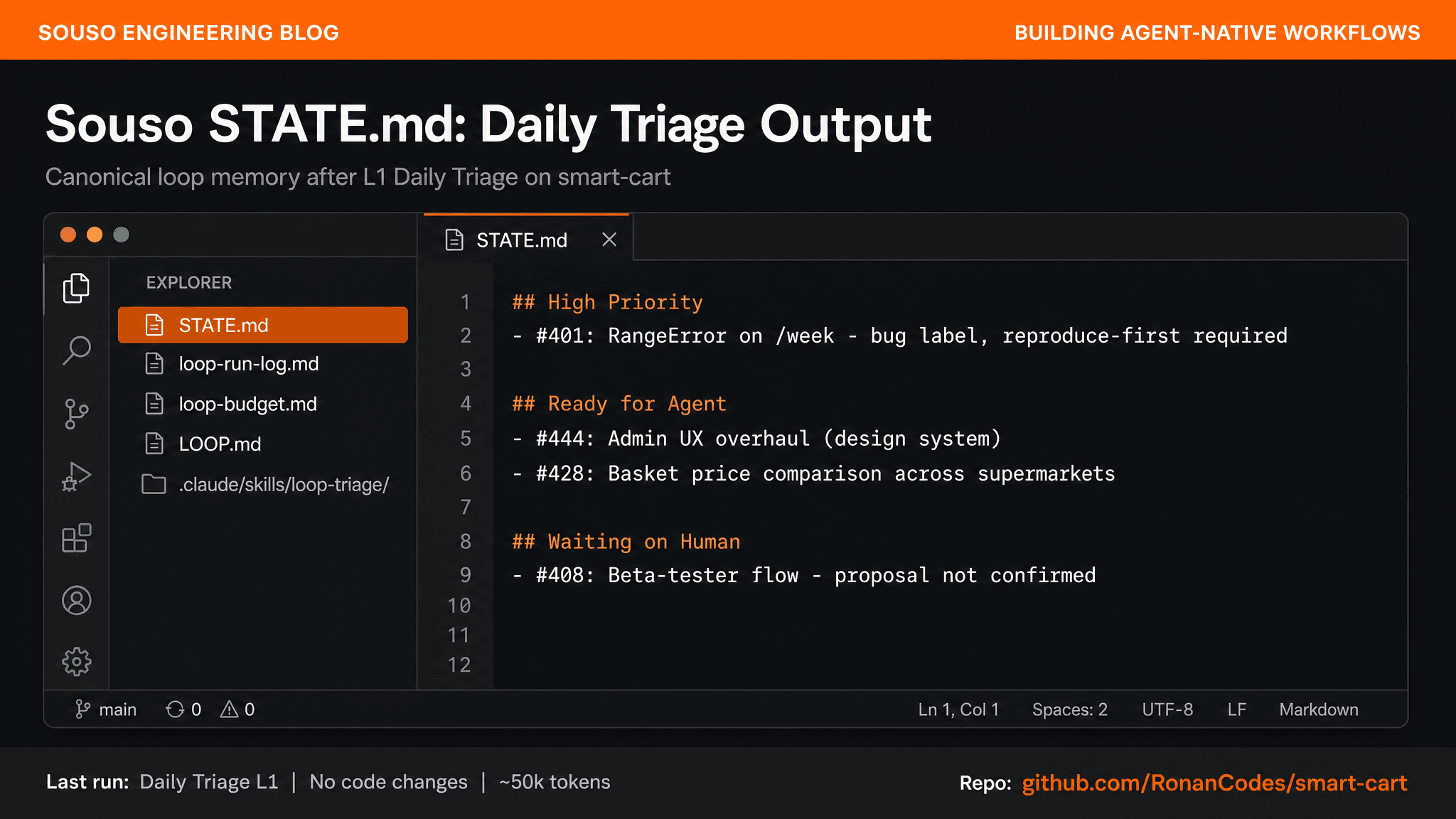
Week-one success criterion: Did the loop surface #401 before you opened GitHub? If yes, L1 is working.
Step 5: Review After One Week
| Question | What good looks like on Souso |
|---|---|
| Accuracy | Caught new bugs, didn't hallucinate closed issues |
| Value | You start the day reading STATE.md, not scrolling 50 issues |
| Format | Team can scan sections in under 60 seconds |
| Cost | ~50k tokens/day, worth it for the signal |
If accuracy is good, consider adding Issue Triage (L1) for unlabeled issues like #528. Do not jump to L2 until triage is trustworthy.
What L2 Looks Like (Not Yet)
When you're ready, after one week of accurate L1:
- Worktree isolation: one worktree per
ready-for-agentissue - Implementer + verifier: verifier runs
pnpm test, not vibes - Reproduce-first: bug fixes start with a failing test per
reproduce-first-tddskill - GitHub MCP write: open PRs, comment on issues; never merge
- Max 3 attempts: then escalate to human
Example L2 scope: typo in a comment, missing import in a test file. Not #401 RangeError on first attempt; that needs human triage to confirm root cause.
Quick Reference
# Manual run
/loop 0 "Run loop-triage once, update STATE.md"

# Daily schedule
/loop 1d "Run loop-triage skill. L1: no code changes."

# Files to check
cat STATE.md
tail loop-run-log.md
The Most Important Thing
"Build the loop. But build it like someone who intends to stay the engineer, not just the person who presses go."
Addy Osmani
Souso has eval gates, ownership boundaries, and a promotion flow (develop → main). A loop that ignores those isn't leverage; it's liability. Start at L1. Read the output. Build trust. Then expand.
Sources: Addy Osmani's Loop Engineering. Loop scaffold from Cobus Greyling's loop-engineering starters (MIT). Cobus Greyling's Loop Engineering essay. Souso loop example: PR #529 · feat/loop-engineering-daily-triage.